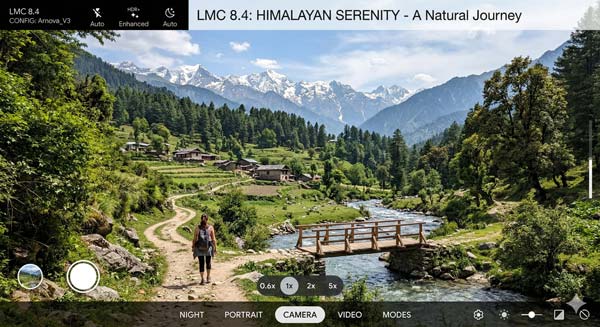
If you are looking for a comprehensive LMC 8.4 Camera Guide to transform your smartphone into a professional photography tool, you have come to the right place. In the modern era of mobile photography, image processing software is just as vital as the camera sensor itself. Many Android enthusiasts struggle with the limitations of their stock camera apps. This is where LMC 8.4, a sophisticated mod inspired by the Google Camera (GCam) architecture, offers a professional alternative for Android users.
In this expert review and setup guide, we will explore the LMC 8.4 Camera Interface, its unique Leica aesthetics, and the process of implementing XML configuration files for DSLR-like results. Whether you own a flagship or a budget smartphone, this article serves as your ultimate resource for mastering this advanced mobile photography tool in 2026.
1. Understanding the LMC 8.4 Architecture
LMC 8.4 is an advanced modification of the official Google Camera (GCam) application, refined by the developer known as Hasli. While the original Google Camera is exclusive to Pixel devices, the LMC 8.4 Setup allows users of various brands—including Samsung, Xiaomi, OnePlus, Realme, and Vivo—to experience superior image processing. The primary advantage of utilizing LMC 8.4 over a standard camera application is its ability to handle complex lighting situations through advanced HDR+ algorithms, resulting in natural skin tones and exceptional dynamic range.
2. Professional Features of the LMC 8.4 Interface
Before you begin your LMC 8.4 Installation, it is crucial to understand the high-end features that make this tool a favorite among mobile photographers. Here are the technical highlights:
A. Sophisticated HDR+ Enhanced Mode
The core functionality of LMC 8.4 lies in its HDR+ Enhanced capabilities. By capturing a rapid burst of frames at various exposures and merging them using computational photography, it preserves intricate details in both dark shadows and bright highlights. This ensures your landscape and portrait photos have a balanced, professional finish.
B. Night Sight and Astrophotography Capabilities
Low-light environments often lead to noisy and blurry photos. However, the LMC 8.4 System includes a refined Night Sight mode that illuminates dark scenes without introducing artificial grain. Additionally, the Astrophotography mode enables users to capture long-exposure shots of the night sky and stars with remarkable precision.
C. Authentic Leica Style Profiles
A standout feature of the 8.4 version is the Leica Mode. This specific setting applies a cinematic aesthetic to your images, characterized by deep contrasts and moody tones. It is an ideal choice for street photographers who want their work to stand out with a “film-like” quality.
D. Advanced Configuration XML Support
The most powerful aspect of the LMC 8.4 Framework is its support for external XML configuration files. These files contain expert-tuned parameters for specific smartphone sensors. By applying an XML config, users can instantly calibrate their camera for optimal sharpness, color accuracy, and noise reduction based on their specific hardware.
3. How to Safely Set Up LMC 8.4 on Your Android Device
To ensure a successful LMC 8.4 Setup on your device, follow these professional installation steps carefully:
- Adjust Security Settings: Navigate to your device’s Settings > Security and permit the installation of applications from verified third-party sources.
- Acquire the Stable Version: Ensure you are using the most stable build of the LMC 8.4 Package. Depending on your device’s architecture, you may need a specific package name (such as Snapcam or Samsung-specific builds).
- Initiate Installation: Open the acquired file and follow the on-screen prompts to complete the process.
- Configure Permissions: Upon launching the tool for the first time, grant necessary access to the Camera, Microphone, and Internal Storage to ensure full functionality.
4. Implementing XML Config Files for Best Results
Mastering the LMC 8.4 Interface requires the use of specialized XML files. Here is the step-by-step implementation guide:
- Using your file manager, create a new directory named LMC8.4 within your internal storage root.
- Place your preferred XML configuration files inside this LMC8.4 directory.
- Launch the camera application and double-tap the empty black space next to the shutter button.
- From the resulting menu, select the XML file that matches your device and select “Import.”
5. Troubleshooting and Optimization Tips
While the LMC 8.4 Camera is highly versatile, you may encounter technical hurdles. Here are the expert solutions:
- Application Stability: If the tool closes unexpectedly, it may be due to an incompatible XML file. Reset the application cache in your device settings and try a universal configuration.
- Viewfinder Performance: For devices with MediaTek processors, adjusting the HDR+ frame count in the advanced settings can often eliminate viewfinder lag.
- Sensor Compatibility: Ensure your smartphone supports Camera2API, which is required for the LMC 8.4 framework to function correctly.
6. Frequently Asked Questions (FAQs)
Q1: Is LMC 8.4 a safe alternative to stock cameras?
Yes, it is a widely used camera modification tool that operates without requiring root access or system-level changes.
Q2: Can I use LMC 8.4 on the latest Android versions?
Absolutely. The LMC 8.4 Framework is designed to remain compatible with Android 13, 14, and the upcoming Android 15 updates.
Q3: Do I need professional photography skills?
Not at all. While it offers pro-level controls, the auto-mode and XML configs make it accessible for any user to get great shots.
Conclusion
In conclusion, the LMC 8.4 Photography System is a powerful asset for any Android user looking to enhance their creative output. By leveraging advanced Google Camera algorithms and custom Leica modes, you can capture professional-grade imagery directly from your smartphone. For more in-depth reviews and technical photography tips, stay connected with ApkRulz. Experience the future of mobile photography today!