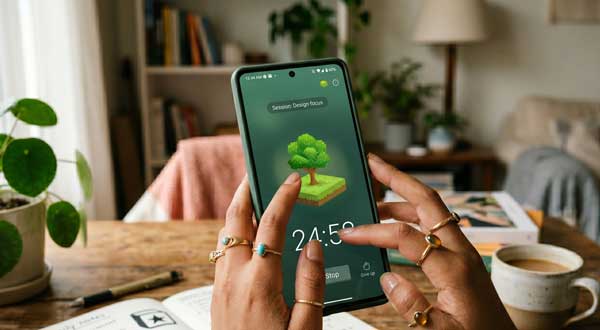
In 2026, smartphone addiction has become a major challenge for everyone. We constantly check social media and lose our focus. Consequently, completing important tasks takes much longer than expected. The Forest app offers a creative and professional solution to this problem. It is a unique productivity tool that gamifies your concentration. If you want to beat distraction and stay focused, this app is your best companion.
In this ultimate guide, we will explore the professional features of Forest on Android. Moreover, we will see how it helps you build healthy digital habits. From growing virtual forests to planting real trees, this manual covers everything. Just as we organized our second brain in our Notion Guide, managing your focus is a vital step in modern mobile productivity.
1. What is Forest and How Does it Work?
Forest is a productivity application designed to keep you off your phone. Specifically, it uses a simple psychological hook. When you need to focus, you plant a virtual seed in the app. Over time, that seed grows into a beautiful tree. However, if you leave the app to check Instagram or YouTube, your tree instantly dies. Therefore, it encourages you to stay away from distractions. As a result, you build a digital forest that represents your hard work.
2. Key Productivity Features of the Forest App
To get the best results, you must understand the core mechanics of the app. Here are the standout features that define its performance:
A. Gamified Concentration Timer
This is the heart of Forest. You can set a timer from 10 to 120 minutes. For example, if you set a 25-minute timer (Pomodoro), you must not touch your phone. Subsequently, you earn coins and experience points. Furthermore, you can unlock new tree species like cedar, sunflowers, or even futuristic AI trees. Consequently, staying focused becomes a fun and rewarding experience.
B. Collaborative “Plant Together” Mode
Focusing alone is hard. However, Forest allows you to plant trees with your friends or colleagues. In this mode, if any person in the group uses their phone, everyone’s tree dies. Additionally, this creates a sense of shared responsibility. This feature is perfect for study groups or office teams who want to maintain high productivity levels together.
C. Planting Real Trees on Earth
What makes Forest truly professional is its impact on the real world. The app partners with “Trees for the Future.” For instance, you can spend your earned virtual coins to plant real trees in Africa. Moreover, over 1.5 million real trees have been planted through the app. Consequently, your personal productivity helps in global reforestation efforts. This is a powerful motivation for eco-conscious users.
3. How to Set Up Forest for Maximum Efficiency
Follow these professional steps to optimize the app on your Android device:
- Enable Deep Focus Mode: First, grant the app permission to detect when you leave the screen for strict enforcement.
- Customize Your Allowlist: Next, add essential apps like your calculator or dictionary to the allowlist. This prevents your tree from dying when you use helpful tools.
- Sync with Your Account: Finally, sign in to track your progress and compete on the global leaderboard with other high-achievers.
4. Professional Tips for Power Users
- Use Detailed Tags: Additionally, tag each session (e.g., Work, Study, Reading) to see a detailed report of where your time goes.
- Set Daily Goals: Furthermore, use the “Daily Goal” feature to challenge yourself to grow a specific number of trees every day.
- Background Focus Music: Moreover, use the built-in ambient sounds like “Rain in the Woods” to create a peaceful environment for deep work.
5. Frequently Asked Questions (FAQs)
Q1: Is the Forest app free on Android?Yes, the basic version is free to download. However, the Pro version allows you to plant real trees and provides ad-free statistics.
Q2: Does it drain my battery?No. Forest is highly optimized. Because the screen stays on only for the timer, it consumes very little power compared to social media apps.
Q3: Can I use it on my PC too?Yes. Forest offers a Chrome extension. Consequently, you can stay focused across all your digital platforms simultaneously.
Conclusion
In conclusion, Forest is an essential tool for anyone living in the digital age. By turning focus into a game, it helps you reclaim your time and achieve your goals. If you want to grow both your digital and real forest, making this app a part of your routine is a brilliant choice. For more professional Android app reviews, stay connected with ApkRulz. Start your focus session today!
App Information:You can access the latest version of the app directly from the official store.