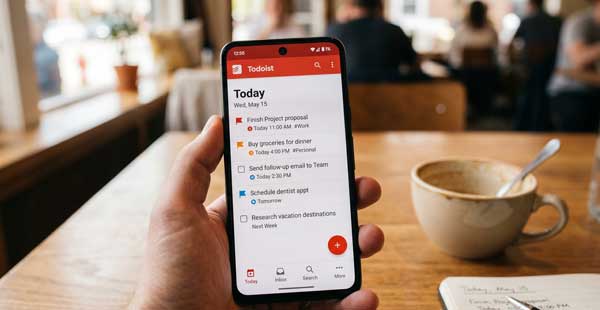
In 2026, staying organized has become a major challenge for everyone. We have many tasks to complete in a limited time. Consequently, we often forget important deadlines or feel overwhelmed by work. The Todoist app offers a professional solution to this problem. It is a powerful task manager that helps you organize your life with ease. Whether you are managing a small project or daily chores, this app keeps you on track. If you want to achieve your goals faster, mastering Todoist is a brilliant choice.
In this ultimate guide, we will explore the professional features of Todoist on Android. Moreover, we will see how it can simplify your daily planning. From natural language input to advanced project filters, this manual covers everything. Just as we built our focus with the Forest App Guide, organizing your tasks is a vital step in modern mobile productivity.
1. What is Todoist and Why is it the Best?
Todoist is a world-class task management application. Specifically, it uses a very clean and intuitive interface. Unlike other complex tools, Todoist focuses on simplicity and speed. Therefore, you can add a task in just a few seconds. Additionally, it is available on almost every platform. As a result, your tasks are always synced between your Android phone, tablet, and computer. This seamless experience makes it a favorite for millions of professionals globally.
2. Key Productivity Features of Todoist
To get the best results, you must understand the core tools of the app. Here are the standout features that define its performance:
A. Natural Language Input
This is the smartest feature of Todoist. For example, you can type “Meeting with team every Friday at 10 am.” Subsequently, the AI automatically sets the date, time, and recurring schedule for you. Furthermore, you don’t need to manually fill in different boxes. Consequently, capturing your ideas and tasks becomes a natural and fast process.
B. Project Organization and Sub-tasks
Big goals can be scary. However, Todoist allows you to break them down into smaller pieces. For instance, you can create a “Work” project and add multiple sub-tasks under it. Additionally, you can use sections to group related items together. This feature is perfect for managing complex projects without losing focus on the small details.
C. Priority Levels and Reminders
Not every task is equally important. Therefore, Todoist offers four priority levels to help you focus on what matters most. For example, you can mark urgent tasks in red. Moreover, you can set location-based reminders. For instance, your phone can remind you to “Buy milk” exactly when you are near the grocery store. As a result, you never miss a thing.
3. How to Set Up Todoist for Maximum Efficiency
Follow these professional steps to optimize the app on your Android device:
- Create Custom Filters: First, set up filters like “High Priority” or “Due Today” to see your most critical tasks instantly.
- Enable Quick Add: Next, use the notification bar shortcut to add tasks without even opening the app.
- Sync with Calendar: Finally, connect Todoist with your Google Calendar to see your tasks and meetings in one single view.
4. Professional Tips for Power Users
- Use Keyboard Shortcuts: Additionally, use shortcuts like “#” for projects and “@” for labels to speed up your task entry.
- Kanban Boards: Furthermore, switch your project view to a “Board” layout for a more visual way to track your progress.
- Karma System: Moreover, track your productivity trends using the “Karma” feature to see how consistent you are over time.
5. Frequently Asked Questions (FAQs)
Q1: Is Todoist free on Android?
Yes, the free version is excellent and supports up to 5 active projects. However, the Pro version offers reminders, more projects, and custom themes.
Q2: Can I collaborate with others?
Yes. Todoist allows you to share projects and assign tasks to family members or colleagues easily.
Q3: Does it work without internet?
Yes. You can add and complete tasks offline. Subsequently, the app will sync everything once you are back online.
Conclusion
In conclusion, Todoist is more than just a to-do list. It is a complete system for personal and professional growth. By organizing your thoughts and tasks, you eliminate stress and gain more free time. If you want to lead a more disciplined life in 2026, making this app a part of your daily routine is a brilliant choice. For more professional Android app reviews, stay connected with ApkRulz. Start checking off your goals today!
App Information:
You can access the latest version of the app directly from the official store.